

Base64 Encoder & Decoder
Encode and decode Base64 text instantly in your browser
- Encode Text
- Decode Base64
- UTF-8 Support
Encode and decode Base64 online with ToolNTip Base64 Encoder. Free, fast and privacy-focused tool with UTF-8 support for Unicode, copy, download and local processing.

A modern identity governance platform for managing users, access, approvals, lifecycle controls, and enterprise identity operations.
About This Tool
Base64 Encoder & Decoder
ToolNTip Base64 Encoder & Decoder is a free online tool designed to quickly encode plain text into Base64 or decode Base64-encoded data back into readable text. The tool works directly in your web browser and supports UTF-8 and Unicode text, making it useful for developers, system administrators, API users, students, technical professionals, and anyone working with encoded data.
Whether you need to encode text to Base64, inspect encoded information, decode a Base64 string received from an API, or simply understand what a Base64 value contains, ToolNTip provides a fast and straightforward browser-based solution.
The tool supports multilingual text including English, Urdu, Arabic, Persian, Chinese, Japanese, Korean, Cyrillic characters, accented characters, symbols, and emoji.
Most importantly, Base64 processing takes place locally in your browser. Your input does not need to be uploaded to ToolNTip servers or transmitted to an external API for encoding or decoding.
What Is Base64 Encoding?
Base64 is an encoding method used to represent binary or text data using a set of printable ASCII characters. It is widely used when information needs to be transported through systems that are primarily designed to handle text.
Standard Base64 uses letters, numbers, and a small number of additional characters:
A-Z, a-z, 0-9, +, /, and =
The equals sign (=) may appear as padding at the end of a Base64 value.
Base64 is commonly encountered in web development, APIs, email systems, configuration files, authentication-related data formats, data exchange, and other software development workflows.
It is important to understand that Base64 is an encoding format, not encryption. Encoding data with Base64 does not make sensitive information secure. Anyone with a Base64 decoder can generally decode the value.
What Does the Base64 Encoder Do?
The Base64 Encoder converts ordinary text into its Base64 representation.
For example, entering:
ToolNTip
and selecting Encode converts the text into its corresponding Base64 value.
This can be useful when preparing text for systems, applications, APIs, or data formats that require Base64-encoded content.
ToolNTip first converts your text into UTF-8 bytes before generating Base64. This is particularly important when working with Unicode and multilingual content.
As a result, you can encode much more than basic English text.
You can work with content containing:
- English text
- Urdu text
- Arabic text
- Persian text
- Chinese characters
- Japanese characters
- Korean characters
- Cyrillic text
- accented characters
- mathematical and technical symbols
- emoji
- mixed-language text
This UTF-8-aware approach helps preserve the original text correctly when it is encoded and subsequently decoded.
What Does the Base64 Decoder Do?
The Base64 Decoder performs the reverse operation.
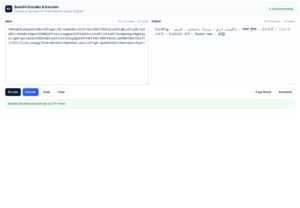
Paste a valid standard Base64 string into the input area and select Decode. ToolNTip converts the Base64 data into bytes and then reconstructs the corresponding UTF-8 text.
This is useful when you encounter encoded values while working with:
- REST APIs
- web applications
- development environments
- configuration data
- debugging
- data exchange
- application logs
- test data
- technical documentation
- encoded text fields
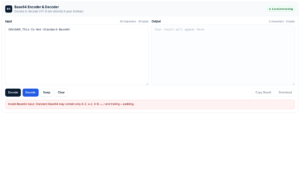
If the supplied value is not valid Base64 or cannot be interpreted as valid UTF-8 text, the tool provides an understandable error instead of presenting a raw JavaScript exception.
Unicode and UTF-8 Base64 Support
One of the important features of the ToolNTip Base64 Encoder & Decoder is proper Unicode and UTF-8 support.
Simple Base64 implementations can sometimes fail when text contains characters outside the basic ASCII character set. This becomes particularly noticeable with languages such as Urdu, Arabic, Chinese, Japanese, or with emoji.
ToolNTip handles text through UTF-8 byte conversion before performing Base64 encoding.
The workflow is effectively:
Unicode Text → UTF-8 Bytes → Base64
When decoding, the process is reversed:
Base64 → Bytes → UTF-8 → Unicode Text
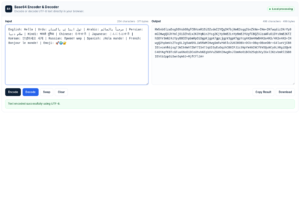
This allows multilingual content to make an accurate encoding and decoding round trip.
For example:
Multilingual Unicode test example
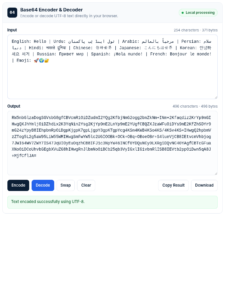
English: Hello | Urdu: ٹول اینڈ ٹِپ پاکستان | Arabic: مرحباً بالعالم | Persian: سلام دنیا | Hindi: नमस्ते दुनिया | Chinese: 你好世界 | Japanese: こんにちは世界 | Korean: 안녕하세요 세계 | Russian: Привет мир | Spanish: ¡Hola mundo! | French: Bonjour le monde! | Emoji: 🚀🌍🔐
can be encoded into Base64 and then decoded back to the same Unicode text.
This makes the tool particularly useful when developers need to test internationalized or multilingual application data.
How to Encode Text to Base64
Using the ToolNTip Base64 Encoder is straightforward.
- Enter or paste your text into the Input field.
- Select Encode.
- The Base64 representation appears in the Output field.
- Use Copy Result to copy the generated Base64 value.
- Use Download if you want to save the result as a text file.
The tool also displays useful information about your input and output, including character and UTF-8 byte counts.
No account or software installation is required.
How to Decode Base64 to Text
To decode Base64:
- Paste the Base64 string into the Input field.
- Select Decode.
- The decoded UTF-8 text appears in the Output field.
- Copy or download the decoded result as needed.
The decoder can safely handle reasonable formatting whitespace that sometimes appears when Base64 content has been wrapped across multiple lines.
Invalid characters or malformed Base64 input will generate an appropriate validation message.
Base64 Character and Byte Statistics
The ToolNTip Base64 Encoder & Decoder also provides lightweight statistics for the data being processed.
You can see information such as:
- input character count
- input UTF-8 byte count
- output character count
- output byte count
Character count and byte count are not always identical.
For basic ASCII text, one character will commonly occupy one UTF-8 byte. Many Unicode characters require multiple bytes when represented using UTF-8.
This makes the statistics useful for developers working with multilingual text, APIs, payload sizes, storage requirements, and encoded data.
Copy, Swap, Clear and Download Results
The Base64 tool includes practical workflow controls so you can work with encoded data without unnecessary manual steps.
Copy Result
Use Copy Result to place the current output on your clipboard for use in another application, development environment, configuration file, or API testing tool.
Swap
The Swap function moves the current result back into the input workflow. This is particularly useful when testing an encode-and-decode round trip.
For example:
Text → Encode → Swap → Decode → Original Text
Clear
Use Clear to remove the current input and output and start a new operation.
Download
Generated results can also be downloaded as text files, which can be useful when working with longer encoded or decoded content.
Base64 Encoding vs Encryption
Base64 encoding should never be confused with encryption.
Encryption is designed to protect information using cryptographic algorithms and keys.
Base64 simply changes how data is represented.
For example:
Original data → Base64 representation
can easily be reversed:
Base64 representation → Original data
Therefore, you should not use Base64 as a security mechanism for passwords, confidential information, API secrets, private keys, or other sensitive information.
Base64 may be part of a larger secure protocol or data format, but Base64 itself does not provide confidentiality.
Why Is Base64 Used?
Base64 remains widely used because some systems need binary or structured information to be represented using text-safe characters.
Typical scenarios include transferring or embedding data in environments where raw binary information may not be convenient or supported.
Developers may encounter Base64 while working with:
- web APIs
- HTTP-related data
- authentication formats
- JSON payloads
- XML documents
- email systems
- application configuration
- certificates and keys
- data URIs
- binary-to-text conversion
- development and debugging workflows
The exact purpose depends on the application or protocol using the encoded information.
Common Uses of a Base64 Encoder & Decoder
API Development and Testing
Developers frequently encounter Base64 values while testing APIs or examining application payloads.
An online Base64 encoder and decoder provides a convenient way to inspect or prepare such values.
Web Development
Web developers may encounter Base64 in data exchange, embedded resources, authentication-related structures, and other browser or server-side workflows.
System Administration
System administrators sometimes work with configuration values, certificates, application settings, scripts, or encoded technical data that needs to be inspected.
Software Debugging
When an application returns an unfamiliar Base64 string, decoding it can help determine whether the value contains readable text.
Education
Students learning about data representation, character encoding, UTF-8, APIs, and web development can use the tool to experiment with the relationship between ordinary text and Base64.
Multilingual Application Testing
Because ToolNTip supports UTF-8 text, developers can test how multilingual values behave during Base64 encoding and decoding.
Privacy-Friendly Local Base64 Processing
ToolNTip’s Base64 Encoder & Decoder performs its encoding and decoding operations inside your browser.
For this tool, your input is not sent to a ToolNTip server for processing and no external API is required to generate the result.
The processing flow is:
Your Input → Your Browser → Result
This approach offers several practical advantages:
- faster processing
- no server round trip
- no account requirement
- no external processing API
- better privacy for ordinary encoding and decoding tasks
However, Base64 itself should still not be considered a security mechanism. Avoid unnecessarily placing highly sensitive information into any application or website.
Why Use ToolNTip Base64 Encoder & Decoder?
ToolNTip focuses on providing practical technical tools without unnecessary complexity.
The Base64 Encoder & Decoder provides:
- fast text-to-Base64 encoding
- Base64-to-text decoding
- UTF-8 support
- Unicode and multilingual text support
- emoji support
- Base64 validation
- helpful error messages
- formatting whitespace handling
- character statistics
- UTF-8 byte statistics
- one-click copy
- input/output swap
- clear/reset workflow
- downloadable results
- responsive desktop, tablet, and mobile interface
- local browser processing
- no external API requirement
- no registration requirement
The objective is simple: enter your data, perform the required operation, and immediately use the result.
Frequently Asked Questions
Is this Base64 Encoder & Decoder free?
Yes. You can use the ToolNTip Base64 Encoder & Decoder directly from your web browser without installing additional software.
Does the Base64 tool support Unicode?
Yes. The tool uses UTF-8 conversion so that Unicode and multilingual text can be encoded and decoded correctly.
Can I encode Urdu text to Base64?
Yes. Urdu text is supported through UTF-8 encoding.
The same applies to Arabic, Persian, Chinese, Japanese, Korean, Cyrillic characters, emoji, accented characters, and mixed-language content.
Is Base64 encryption?
No. Base64 is an encoding method and does not encrypt or securely protect information.
Can Base64 be decoded?
Yes. Standard Base64 is reversible. If the encoded bytes represent valid UTF-8 text, this tool can convert them back into readable text.
Does ToolNTip upload my Base64 data?
No. Encoding and decoding in this tool are performed locally by JavaScript in your browser. The tool does not require your input to be uploaded to a server for processing.
Does the tool support Base64 with line breaks?
The decoder handles reasonable formatting whitespace, including whitespace that may appear when Base64 data is split across lines.
What happens if I enter invalid Base64?
The tool validates the input and displays an error when the supplied value cannot be processed as valid supported Base64 data.
Can I copy the Base64 result?
Yes. Use the Copy Result button to copy the generated output to your clipboard.
Can I download the encoded or decoded result?
Yes. The output can be downloaded as a text file directly from the tool.
Does Base64 make data smaller?
Not normally. Base64 representation generally increases the size of the underlying binary data because binary information is represented using printable text characters.
Base64 is primarily intended for representation and transport compatibility, not compression.
Do I need to install a Base64 encoder?
No. ToolNTip runs directly in a modern web browser, so no additional Base64 software needs to be installed.
Encode and Decode Base64 Online
ToolNTip Base64 Encoder & Decoder provides a convenient way to encode text to Base64 online and decode Base64 to UTF-8 text without installing additional software.
It combines standard Base64 processing with Unicode support, input validation, useful statistics, copy and download functionality, and local browser-based processing.
Whether you are debugging an API response, preparing encoded text for development, examining application data, learning how Base64 works, or testing multilingual UTF-8 content, the tool provides a focused environment for completing the task quickly.
Enter your text or Base64 value in the tool above, select Encode or Decode, and use the generated result immediately.
Key Features
- Encode Text
- Decode Base64
- UTF-8 Support
- Copy to Clipboard
- Download Result
- Swap Input and Output
- Clear Input
- Character Count
- Byte Count
- Browser-Based Processing
Pros & Cons
Pros
- Fast browser-based encoding and decoding
- Simple developer-focused interface
- Copy results with one click
- No registration required
Cons
- Not intended for encryption or secure data protection
- Advanced binary file workflows can be added later
Screenshots


Video Overview
Community Reviews
Ratings and reviews from ToolNTip users.
Write a Review
You must be logged in to post a comment.